
Menubloom
The right-click menu your Mac is missing — New File, Copy Path, Open in Terminal, and more in Finder.
Version 0.5.3 · macOS 12+ · Apple Silicon + Intel

Do the everyday file tasks without leaving Finder
Create a document from a template, copy a path in the format you need, open a folder in your terminal or editor, and move files with Windows-style Cut and Paste. Menubloom puts these actions directly in Finder's right-click menu.
Turn on the Finder extension from the checklist in Settings, then right-click in any Finder window. Menubloom is open source and MIT licensed.
New files from your templates
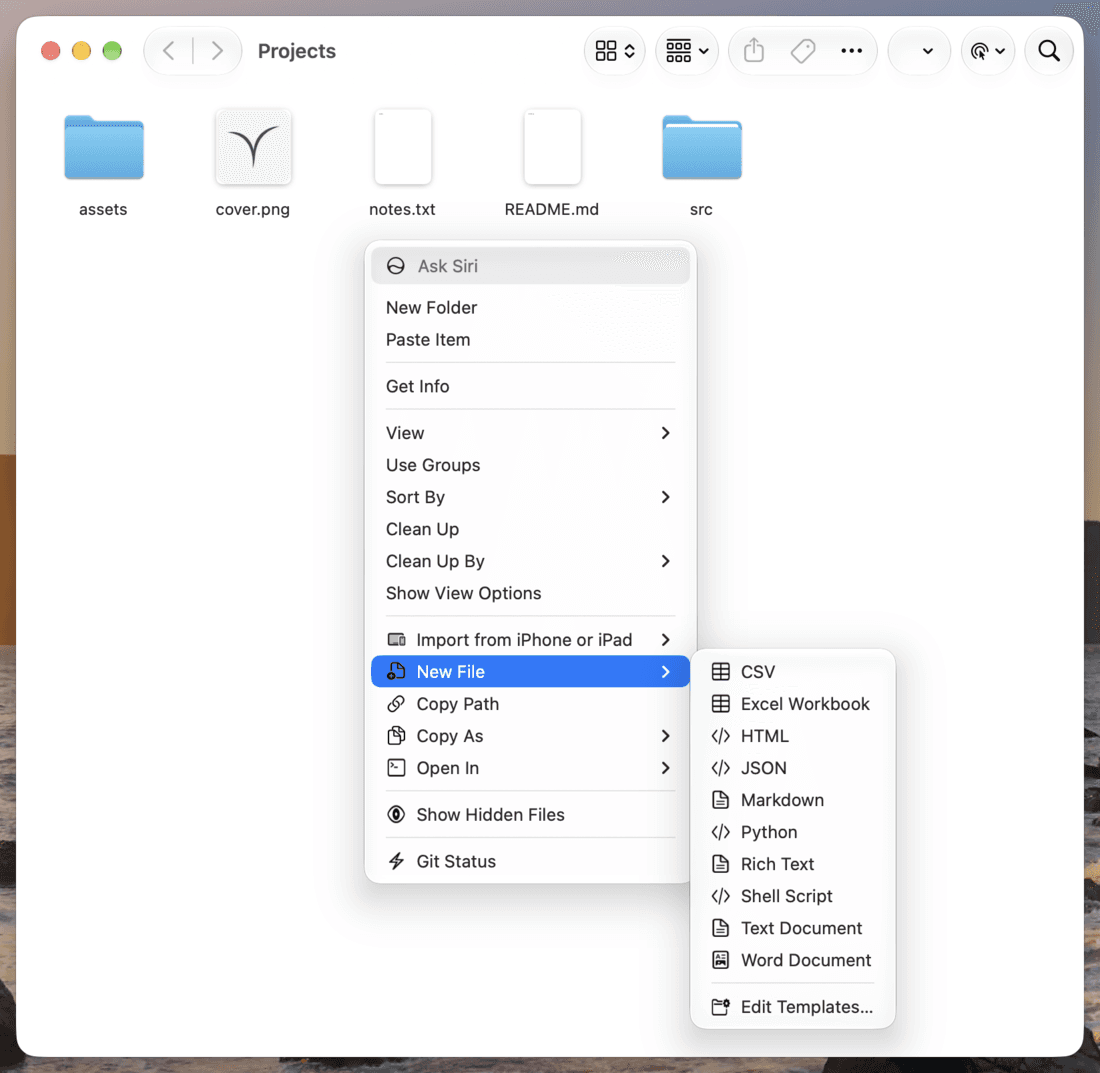
Right-click a folder to create Text, Markdown, Word, Excel, RTF, HTML, JSON, CSV, Python, or Shell files. Name the file, press Return, and Menubloom selects it. Drop your own files into the Templates folder to add more kinds.
Paths, apps, and file actions
Copy full paths, names, shell-quoted paths, URLs, Markdown links, hashes, and more. Open selections in your terminal or editor, move files with Cut and Paste Here, or run common file actions without leaving Finder.

A Finder menu that works your way
Choose the actions you use, arrange the menu, and add shortcuts or custom shell commands.
Arrange your menu
Turn groups off, reorder them, or show their items inline instead of in a submenu.
Global shortcuts
Assign shortcuts to New File, Copy Path, Open In, Cut, Paste, and other built-in or custom actions.
Convert and resize images
Create PNG, JPEG, HEIC, TIFF, or ICNS copies, or resize images to a chosen longer-side dimension.
Custom shell actions
Run your own commands with selected paths as arguments, filtered by file type, item count, and folder.
Private by design
Menubloom collects nothing. Its only network connection is a once-a-day check for a new version on GitHub, which you can turn off in Settings. Its settings stay on your Mac.
Cloud folder services
Use common actions through Finder Services in iCloud Drive, Dropbox, and OneDrive folders.
Every detail, polished.
Menubloom New File templates in Finder's right-click menu
Menubloom — the right-click menu your Mac is missing
$0
Version 0.5.3 · MIT licensed
- New File with custom templates
- Copy Path, Copy As, and file information
- Open in terminals and editors
- Cut, Paste, Copy To, and Move To
- Custom shell actions and global shortcuts
- Universal app for Apple Silicon and Intel
- macOS 12 or newer
- Signed & notarized
Or install with Homebrew:
brew install --cask lzhgus/tap/menubloomMenubloom FAQ
Common questions about the free, open-source Finder extension for macOS.
What does Menubloom add to Finder?
Menubloom adds New File templates, Copy Path and Copy As, file information, Open In, Cut and Paste Here, Copy To and Move To, file actions, image conversion and resizing, hidden-file controls, and custom shell actions.
Is Menubloom free and open source?
Yes. Menubloom is free and open source under the MIT license. You can download the app or build it from the source on GitHub.
What are the system requirements?
Menubloom requires macOS 12 or newer. The release is a universal app for Apple Silicon and Intel, and the DMG is signed and notarized.
Can I install Menubloom with Homebrew?
Yes. Run `brew install --cask lzhgus/tap/menubloom`, open Menubloom, and follow the Settings checklist to turn on the Finder extension.
Does Menubloom collect data?
Menubloom collects nothing. Its only network connection is a once-a-day check for a new version on GitHub, which you can turn off in Settings. Its settings stay on your Mac.